
P999 Download — Getting the Real APK Onto Your Android Phone
Downloading P999 takes about three minutes, and roughly half of that is your phone asking whether you are sure. Nothing here is technical. What trips people up is not the install itself but knowing which file to install, because a completely unrelated app shares the name on Google Play. Get that part right and the rest is tapping Next.

Why P999 Is Not on Google Play
Google restricts real-money gaming apps in most markets, and Pakistan is one of them. Developers in this category either strip out the money features to get listed, or skip the store and distribute the APK themselves. P999 does the second.
What sits on Google Play under the P999 name is an unrelated puzzle game. No wallet. No deposits. No withdrawals. If you install that and go looking for a Deposit button, you will not find one, because it does not exist in that app.
This is the single most common wasted twenty minutes in the whole P999 experience. If your app has no wallet, you have the wrong one. Uninstall and start again from the official link.
What You Need Before You Start
| Requirement | Detail |
|---|---|
| Android version | 5.0 (Lollipop) or newer |
| Download size | Roughly 25 to 40 MB |
| Free storage | 150 MB or more, so game data and updates have room |
| RAM | 2 GB runs it; 3 GB or more is smoother on fishing and slots |
| Connection | 3G plays; 4G or Wi-Fi if you touch crash games |
| SIM | An active Pakistani number that can receive SMS |
| iPhone | No iOS build. Use the mobile site in Safari instead. |
| Cost | Free to download, free to register |
The SIM matters more than the phone. Registration and every later login depend on an OTP arriving by SMS, so the number you use has to be one you actually hold and can receive messages on.
The Download, Step by Step
- Open the official link in Chrome or your default browser. Not a file someone forwarded to you in a group chat.
- Accept the browser warning. Chrome warns that APK files can harm your device. It shows that for every APK ever downloaded, not because of anything specific to P999. Tap Download anyway if you started the download yourself.
- Let it finish. Around 30 MB is 20 to 40 seconds on 4G. A partial download will fail to install with a parse error.
- Check the file in your notification shade before tapping it. Name and size should look sensible.
Turning On Unknown Sources, by Phone Brand
Android will not install anything from outside the Play Store until you grant permission to the specific app doing the install, usually Chrome. You do it once and it stays done. The menu path differs by manufacturer:
| Brand | Path |
|---|---|
| Samsung (One UI) | Settings → Apps → Special access → Install unknown apps → Chrome |
| Xiaomi / Redmi (MIUI, HyperOS) | Settings → Privacy protection → Special permissions → Install unknown apps → Chrome |
| Infinix / Tecno / itel | Settings → Security → Install unknown apps → Chrome |
| Oppo / Realme (ColorOS) | Settings → Password & security → System security → Install external sources |
| Vivo (Funtouch OS) | Settings → More settings → Permission management → Install unknown apps |
| Stock Android (Pixel, Nokia, Motorola) | Settings → Apps → Special app access → Install unknown apps |
- Tap the APK from the notification shade or Files → Downloads.
- Tap Install. Ten to twenty seconds on most phones.
- Tap Open, or find the P999 icon on your home screen.
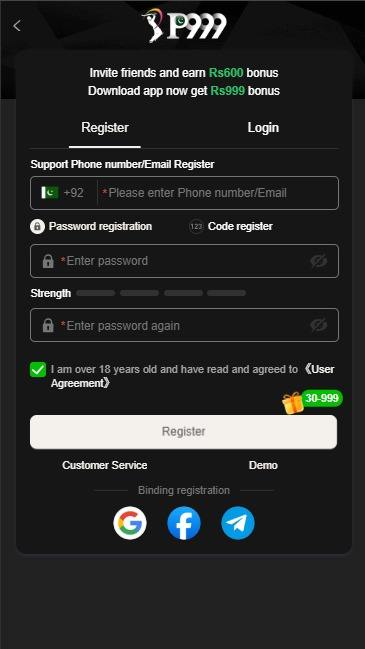
- Register with your number and submit your CNIC in the same sitting. See the login and registration guide.
Install Errors Decoded
| Message | What it means | Fix |
|---|---|---|
| App not installed | An older or differently signed P999 build is still on the phone | Uninstall the existing P999 completely, then install again |
| Parse error | The download was interrupted or the file is corrupt | Delete it and download again on a stable connection |
| Install blocked | Unknown sources not granted to your browser yet | Follow the brand path above |
| Insufficient storage | Under roughly 150 MB free | Clear cached photos or unused apps and retry |
| Play Protect warning | Google flags everything installed outside the Play Store | Expected. Continue only if you used the official link |
| Installs, then crashes on open | Android below 5.0, or a stale WebView | Update Android System WebView from Play Store, relaunch |
Spotting a Modified Build
Repackaged P999 files circulate constantly in WhatsApp and Telegram groups. They are the main way accounts get emptied. Walk away if any of this applies:
- It is advertised as a mod, hack, unlimited money or VIP unlocked build. No such legitimate version exists.
- The download page wants you to complete a survey, disable antivirus, or install a "helper" app first.
- The app asks for permissions a gaming app has no use for — reading SMS, your contacts, or accessibility services.
- The file size is nowhere near the official one. 5 MB or 300 MB are both wrong.
- The link is shortened with no visible destination domain.
- Someone sends you the file directly instead of a link to the official source.
Why this matters more than the download itself. A modified build can read the OTP that arrives on the same phone. That means whoever built it can empty a funded wallet without ever needing your password. Treat any "unlocked" version as hostile.
The First Five Minutes After Installing
- Register with a number you control
- Submit CNIC straight away
- Match wallet name to account name
- Enter a referral code at signup
- Claim the day-one reward
- Decide a budget before depositing
The referral code is the only one of those you cannot go back and fix. It has to be entered during registration, and support cannot apply it afterwards. Everything else can wait an hour if you are in a rush. Details are on the bonus and referral guide, and payout mechanics on the deposit and withdrawal guide.
Get the official P999 APK
Free, Android 5.0 and above, no Play Store account needed. Register with your mobile number and claim the signup bonus.
Download Questions
Is the P999 APK free?
Yes. The download and registration both cost nothing. Money only enters when you choose to deposit.
Why does Chrome warn me about the file?
Chrome shows that warning for every APK, because APKs bypass the Play Store review. It is a statement about the distribution method, not a virus detection.
Is there a P999 app for iPhone?
No official iOS build exists. iPhone users open the P999 site in Safari and use the mobile web version, which handles the same login, deposits and withdrawals.
How much space does it need?
The download is 25 to 40 MB, but leave at least 150 MB free. Low storage is a common reason the app installs and then refuses to open.
Can I install it on an Android emulator on PC?
It is not supported and emulators can trigger security checks on the account. Use a real phone.
How do updates work after install?
The app prompts you in-app when a new build is available. Accept that prompt rather than searching for an APK elsewhere — searching is exactly how people end up with a modified build.
18+ only. P999 involves real money and uncertain outcomes. 66P.com.pk is an independent guide and is not the owner or operator of the P999 app. Download links on this page are affiliate links.