
P999 Login — OTP Sign In, Error Fixes and Account Recovery
There is no username to remember and no email to confirm. You type a Pakistani number starting with 03, a six-digit code arrives by SMS, you type that, and the lobby opens. When it fails, it is almost never the account — it is the number format, an active VPN, too many code requests in a row, or a SIM that cannot receive SMS. All four are fixable in under five minutes.

Start With the One Rule That Protects Your Wallet
Real P999 login happens inside the app. If a website, a WhatsApp contact or a Facebook page asks you to type your OTP into their form, it is phishing. There is no exception to this, and no genuine agent will ever ask for that code.
Everything else on this page is troubleshooting. That paragraph is the part that actually costs people money when they ignore it.
Signing In, Step by Step
- Open the P999 app. Unofficial web mirrors are not safe and are not the real login.
- Tap Login, and check the tab underline — Register and Login share one panel.
- Enter your number as 03XXXXXXXXX. If the field already shows +92, drop the leading zero.
- Tap Get code and wait. Five to thirty seconds on a normal signal.
- Type the six digits with no spaces.
- Tap Login. The lobby loads with your balance visible.
If you set a password when you registered, use it instead. Password login does not depend on SMS delivery, which is exactly why it is worth setting one on day one.
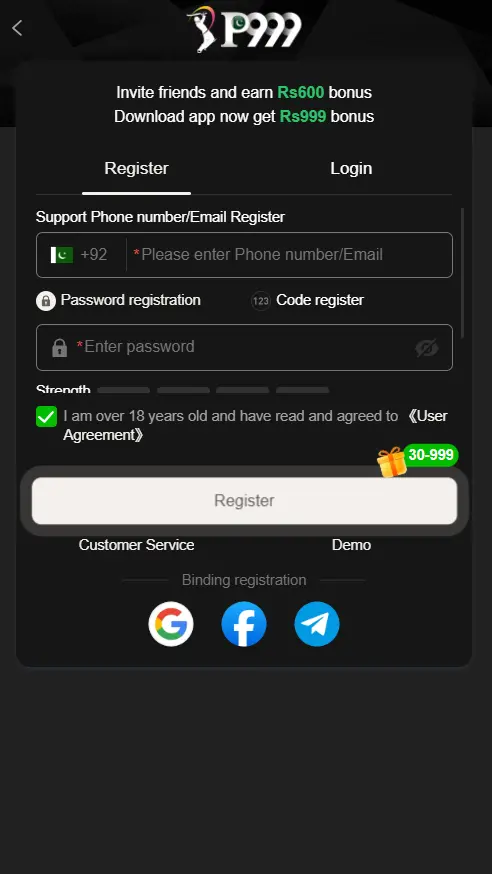
Creating a First Account
- Tap Register rather than Login.
- Enter your Pakistani number and read it back once before continuing.
- Choose password registration if offered. It gives you a route in when SMS is slow.
- Set a password that clears the strength meter — mixed case plus digits, eight characters or more.
- Enter a referral code now if you have one. It cannot be added later.
- Tick the 18+ agreement. Register stays greyed out until you do.
- Confirm the OTP.
- Submit your CNIC immediately, because withdrawals stay locked until it clears.
When the OTP Never Arrives
This is the most reported P999 problem and it is nearly always the network or the handset, not the account. Work down the list in order:
- Turn the VPN off. A non-Pakistani exit node is the single biggest cause of blocked verification SMS.
- Check your signal. Step to a window. One bar can carry data and still drop SMS.
- Confirm the SIM can receive messages. Prepaid SIMs left dormant for months sometimes lose messaging service quietly.
- Look in spam or blocked messages. Some Android skins file short-code senders separately.
- Wait two full minutes before requesting again. Rapid re-requests trigger a rate limit and invalidate earlier codes.
- Restart the phone. More reliable than toggling airplane mode for clearing a stalled network registration.
- Put the app on Wi-Fi while keeping the SIM in the phone for the SMS.
- Free up storage. A full message store silently drops incoming SMS on older devices.
Still nothing after all eight? Contact support from inside the app with your registered number and roughly when you last requested a code. Do not post your number in a public Facebook group asking for help — that is an invitation to impersonators.
Error Messages, Translated
| Symptom | Why It Happens | Solution |
|---|---|---|
| No OTP arrives | Weak signal, VPN active, dormant SIM | VPN off, check signal, restart, wait 1 to 2 minutes |
| Invalid OTP | Code expired, or you used an older SMS | Request a fresh code and use only the newest message |
| Wrong number format | +92 combined with a leading zero, or spaces | Use 03XXXXXXXXX, or +92 then 3XXXXXXXXX — never both |
| Too many attempts | Repeated rapid code requests | Wait 5 to 10 minutes, close the app fully, retry once |
| Account not found | Logging in with a number that was never registered | Switch to the Register tab and create it first |
| App will not open | Outdated build or low storage | Update, clear cache, free at least 150 MB |
| Cannot connect | Weak internet or scheduled maintenance | Switch to Wi-Fi and retry in a few minutes |
| Account restricted | More than one account on the same device | One account per device. Contact in-app support |
| Wrong app entirely | You installed the Play Store puzzle game | Uninstall, then get the real APK |
Passwords and Account Recovery
Forgot a password you set? You do not need support. Tap Forgot Password, enter your registered number, confirm the OTP, set a new one. Balance and history stay untouched.
Notice what that depends on: receiving the OTP, which means still holding the SIM. If the number is gone, in-app support with your CNIC details and transaction history is the only legitimate route back. Nobody messaging you privately can restore an account, whatever they claim.
New Phone, New SIM
- New phone, same SIM. Install the APK, log in with the same number, confirm the OTP. Expect one extra verification prompt the first time an unrecognised device signs in.
- Same phone, SIM moved slots. The app does not care which slot. It only needs the registered SIM present to receive the code.
- Different number entirely. An account is tied to the number it was created with. You cannot migrate a balance yourself — open a support ticket before you stop using the old SIM, not after.
- Travelling abroad. Keep roaming SMS active. A VPN will not help and usually makes delivery worse.
Staying Safe
- Never share an OTP. Not with support, not with an agent, not with a friend.
- Never type an OTP into a website. In-app only.
- Never install a "mod" or "unlocked" P999 build — it can read the code arriving on the same phone.
- Set a password so signing in does not depend on SMS.
- Keep your P999 account name identical to your JazzCash or Easypaisa name, or payouts get rejected.
- One account per device. Multiple accounts is the most common restriction trigger.
- Lock your phone. A funded wallet on an unlocked handset is the real exposure.
Not installed yet?
Login only exists once the real-money APK is on your phone. Download it, register, and set a password in the same session.
Login Questions
Can I log in to P999 from a website?
Login for the real-money app happens inside the app. Any third-party website asking for your number and OTP is phishing, no matter how official it looks.
Do I need a password?
No. OTP alone works. Setting a password during registration is optional but recommended, because it removes your dependence on SMS delivery.
Why does it say too many login attempts?
Requesting codes repeatedly in quick succession trips a rate limit. Wait 5 to 10 minutes, close the app completely, then request one code and use it.
Can two people use one account?
No. It is tied to one number and one CNIC, and withdrawals must go to a wallet in that same name. Sharing risks the balance if it triggers a review.
Which number format does P999 accept?
Either 03XXXXXXXXX with the leading zero, or +92 followed by 3XXXXXXXXX. Never both together, and never with spaces or dashes.
I lost my registered SIM. What now?
Contact in-app support with your CNIC details and transaction history. That is the only legitimate route, and it is slower than getting a replacement SIM for the same number if that is still possible.
18+ only. 66P.com.pk is an independent guide. We do not operate P999 and we hold no player accounts, so we cannot recover, unlock or credit anything — only in-app support can.